How to search your photos privately, without uploading them
The short answer
Search the photos where they already are. Finder and File Explorer find photos by name, date and kind without uploading anything. To search by what is in them or the words written in them, use an app that reads the pictures on your own computer, so nothing has to be uploaded to be searched.
Know where your photos are
- Photos in a photo app live in its library. Photos you saved yourself are usually in Downloads, Desktop, Pictures or an external drive.
- If your photo app backs up to the cloud, those copies are already uploaded. Searching them there is up to that service.
With built-in search
- On a Mac, press ⌘ F in Finder and add the rule Kind is Image, plus a date if you know roughly when.
- On Windows, type
kind:picturein File Explorer, with a date such asdatetaken:last year.
This finds photos by name and date. It can't tell a beach from a birthday.
By what's in them, on your computer
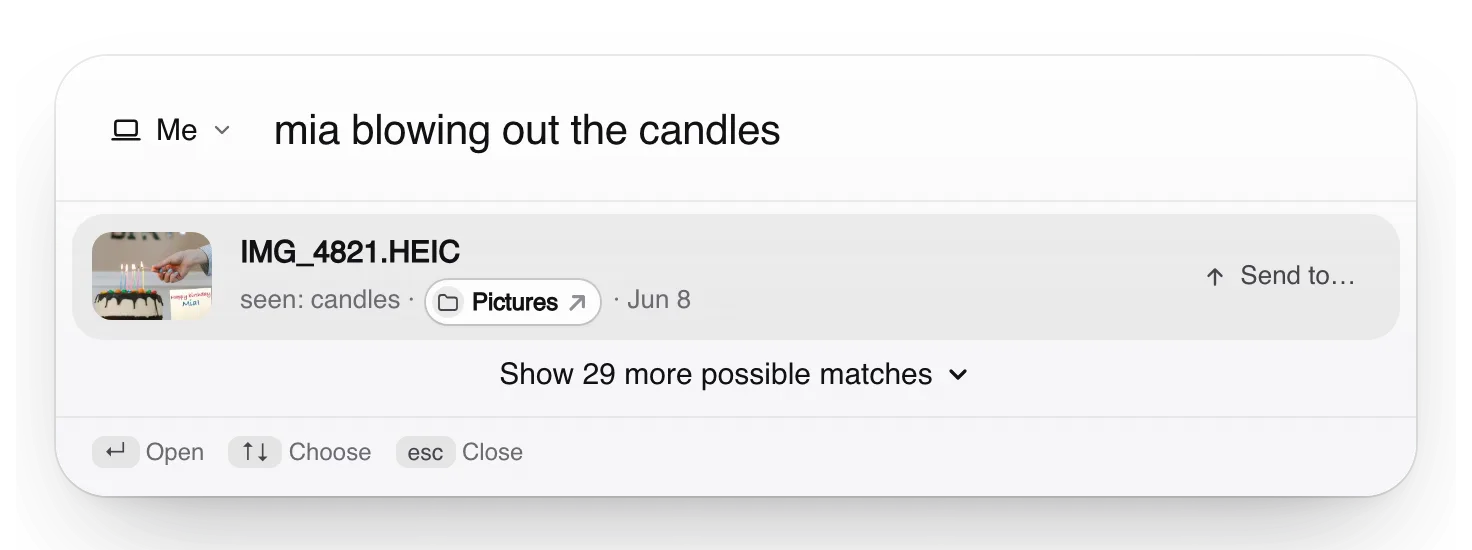
Truffle looks at the photos on your computer and reads the words in them, so you can type “mia blowing out the candles” or “the receipt for the navy sofa”. What it saves to find them, a short description and a search fingerprint that can't be turned back into the photo, stays on your computer. Nothing is uploaded to us to search them.
It doesn't recognise faces: Mia is found by the candles and her name written in the photo. To share a set, like a whole trip, it sends the photos encrypted to people you choose and leaves out any it has flagged as sensitive until you add them yourself. Check the set before you send: it can miss a sensitive photo.
Free. Your files are searched on your own computer, not uploaded to us.
Apple, Mac, macOS, Finder and Spotlight are trademarks of Apple Inc., registered in the U.S. and other countries and regions. Windows and File Explorer are trademarks of the Microsoft group of companies. PageDuo is not affiliated with, endorsed or sponsored by Apple or Microsoft.